
The #1 request we get from fans of our Bass of the Week series is that they want a demo of the instruments featured.
To those who make this request, there are a few things to bear in mind:
1. Guys and gals who build bass guitars aren’t recording engineers
These people are guitar builders first, and that’s where their passion lies. In other words, it’s the craft that comes first before any other consideration.
2. Many builders are camera shy
You may ask, “Why would anyone who builds be camera shy?” The answer is that some people just don’t like being on camera, and you have to respect that.
3. Many builders aren’t pro-level players
The general rule of thumb is that builders build and players play. Sometimes there are those that do both equally well. But more often than not, a builder builds well and has average playing ability – and there’s nothing wrong with that.
4. Putting together a proper demo isn’t easy when you don’t know how
If the builder doesn’t really have any idea how to record a bass, there isn’t going to be a demo…
…but that’s where this article comes in.
If you are a builder or even just someone trying to get a nice and easy way to record an electric bass guitar that sounds right or at least mostly-right, this is the article you’ve been looking for.
Important note before starting: The emphasis here is on easy, and not super-awesome-studio quality.
Decide whether to use a desktop computer or standalone recorder
The desktop computer method
If you use a desktop PC or Mac, which most of you do, you will need an audio interface and some kind of software to record your stuff.
This is an example of a USB audio interface:
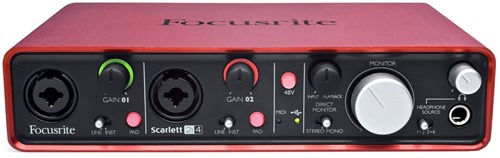
Focusrite Scarlett 2i4 USB Audio Interface
This particular interface features two inputs that can accept XLR or standard 1/4-inch. It’s small and gets the job done.
After that, you need software to access the interface so you can record stuff. You can pay for software, or use something free.
If going the free route, there’s Audacity that works on PC/Windows, Mac or Linux.
If going the paid route, there are several options. One of them is Reaper.
Upon seeing Reaper, you might be intimidated by it, but fortunately they have a very good support community that will answer any and all questions you might have about using it. That support will help you along quickly and easily.
Got a suggestion for paid software that’s easy? Post a comment below with your suggestion(s). Remember, it has to be easy.
The standalone recorder method part 1
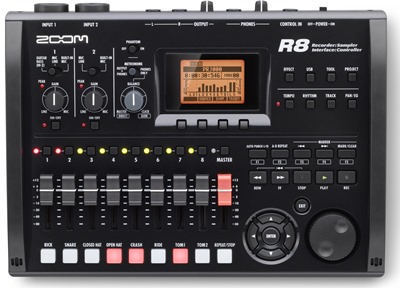
Zoom R8
If you’re the type of person that says, “F#%$ the computer, I want something I can just plug in, hit record and go,” something like the Zoom R8 would suit you a lot better.
These are the things about the R8 that anti-computer people will appreciate very much:
First, it can run off just 4 AA batteries (or USB – no “wall wart” power adapter required here.)
Second, it does have a simple drum machine built-in if you need a little drum track to play along with. So if you absolutely have to have a drum track to play along with, even if a simple one, the R8 has it built right in.
Third, it has real faders (important to builders who like tactile feel.)
Fourth, it has everything in it needed to get a good sound. Plenty of EQ options, compressor, effects, noise reduction and a whole lot more.
Fifth, it has two real-deal inputs that can accept 1/4-inch or XLR.
Sixth, you can operate the whole thing using just headphones.
Seventh, it’s easy to get a master WAV file of anything recorded to the computer afterward via USB.
There’s a lot more to the R8, but the point is that it is, quite literally, an out-of-the-box recording solution. Because of the R8’s size, you can bring it right in the shop, plug in, hit record and go. It runs off 4 AA’s so the only thing you need to plug in is your bass guitar. No amplifier is necessary, so all you need is headphones.
You could even use the R8 for quick electronics testing with headphones while in the shop.
The standalone recorder method part 2
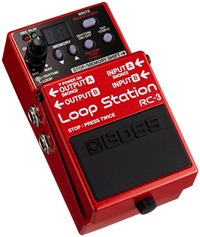
BOSS RC-3 Loop Station
This is the easiest of the easy when it comes to recording a quick demo.
Plug in, stomp, record, stomp again, save, done.
The BOSS RC-3 in particular can record up to 3 hours of audio, and it has the ability to export recordings as WAV files to your computer.
Being it is a pedal, it has to be output somewhere (like an amplifier) so you can hear what you’re doing when recording a loop, but you already knew that.
Even if you never use the looping features of this pedal, the point is that it would be tough to find anything easier than this for recording quick-and-dirty demos.
And yes, it has a simple drum machine built-in to it, just like the R8, so if you need drums to play along with, it has them.
Where should you post your demo once completed?
The easiest place to do this is SoundCloud; this is a site that’s very well known to audio and music fans of all kinds.
The best part is that SoundCloud supports a ton of different audio formats. So if you upload in AIFF, WAV, FLAC, MP3, WMA or whatever you use, SoundCloud will be able to use that.
SoundCloud is mentioned specifically for the camera-shy folk out there. If the thought of getting on camera makes you want to hide under the bed, don’t do it. Record just the audio instead and post to SoundCloud to get your demo out there.
“Why can’t I just use a digital camera, camcorder or smartphone to record with?”
You could do that, but the reason why you shouldn’t is because it makes for an awful demo sound.
Microphones on digital cameras, camcorders and phones use a ridiculously compressed sound, and with the video recording feature, there’s ordinarily no way to turn that off. And even if you could turn off that compression, the in-built microphone would barely be able to pick up anything that would sound any good, or it would distort in a bad way all over the place.
For example, if you took a smartphone and set it right in front of a cabinet speaker, it’s pretty much guaranteed you won’t like the recorded sound. Yes, it will record just fine, but the audio recorded won’t be anything like what your ears hear.
The best and easiest way to get a demo tone is by plugging in direct, because what you hear through headphones is exactly (more or less) what you’ll get. For that, you need something to plug the bass in to. The PC/Mac way or the standalone recorder way allows you to do that.
Got suggestions for bass builders so they can record demos easier?
Feel free to post comments on what you think is easy – repeat, EASY – and works best for the bass builders. And remember, the goal is not studio-perfect audio quality, but rather something simple that can just get the instrument heard on the internet.


Good article! One question I have is about the suitability of audio interfaces available on the market for recording bass. For example, Focusrite 2i4 allow recording bass lines with quality required for a professional recording? The preamps of this interface are indicated for bass?
The Focusrite claims “Precision, quality conversion at up to 24-bit, 96kHz sampling” and “Better than 105dB dynamic range on record and playback”, along with stating it has won awards for the preamps it uses. So I would guess that yes, it is suitable for pro-quality recording.
Get a DI-Box between your bass and your interface. The best 10 euros I’ve spent.
Get a DI-box between your bass and your interface. Best spent 10 euros in my life.
You can do quick and easy recording using an iphone, IRig HD interface and AmpliTube software.
Zoom H4n or H6 or similar handheld 2-track recorder can work well. I personally own and use an H4n all the time. I usually upload the raw wav file into a DAW for further tweaking, but it’ll do the job simply and cheaply. You could even use the built in mics, which are decent enough, to record live from your amp as well as plugging in direct.
Another “Demo” problem recording at home with a mike in the room instead of going direct is that the mike hears everything. Your neighbors, traffic, birds and airplanes, leaf blowers and on and on.